


File Templates
File templates let you quickly create files with the right dimensions for your target platform. Enter your own dimensions or choose from presets across the blank, social media, console, store, and starter categories.
Using Templates
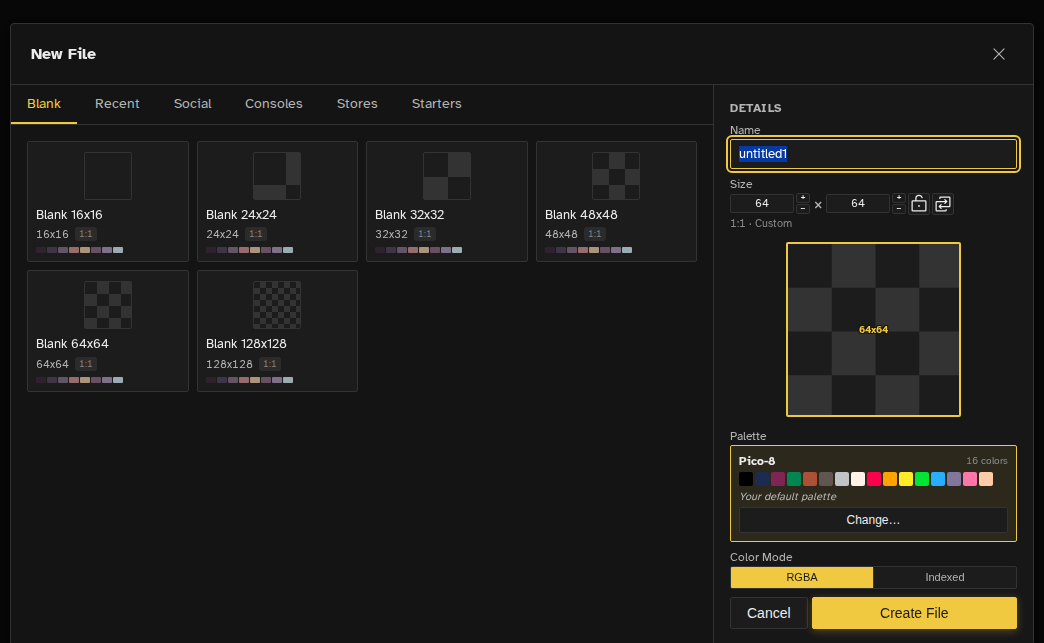
When creating a new file, the New File dialog shows template presets organized by category. Each preset displays a visual preview with dimensions and aspect ratio. Presets that ship several sizes add a size dropdown once you pick them.
The dialog opens on the Blank tab, with the name field focused and its text selected so typing replaces it. The one exception is the first run: the welcome screen's call to action opens the dialog on Starters, so your first file can be a real project instead of an empty canvas. That shortcut is desktop and tablet only. On a phone the same button goes straight to the file grid.
Whichever tab you are on, the panel beside the presets holds the settings the file is actually created with:
- Name - The file name, prefilled with the next untitled name.
- Width and height - With a swap button, a lock that keeps the aspect ratio while you type, and a live preview of the shape you are about to get.
- Palette - A card showing the starting palette, its swatches and why it is suggested. Change… opens a searchable tray with palettes suggested for the preset, the built-in art palettes, the craft palettes, and a "no palette" option for starting empty.
Template Categories
| Category | Examples |
|---|---|
| Blank | Empty canvases at the six common sizes: 16x16, 24x24, 32x32, 48x48, 64x64, and 128x128. For anything else, type the width and height you want |
| Social Media | YouTube, Twitter/X, Instagram, TikTok, Twitch, Facebook, LinkedIn, Pinterest with format variants (profile, banner, post, story) |
| Game Consoles | Game Boy, Game Boy Color, Game Boy Advance, NES, SNES, Nintendo 64, Nintendo DS, Nintendo 3DS (top and bottom), Master System, Genesis / Mega Drive, Game Gear, Saturn, Dreamcast, PlayStation 1, PSP, PS Vita, Atari 2600, Atari Lynx, Neo Geo Pocket, WonderSwan, and TurboGrafx-16 |
| App Stores | App icons and graphics for Apple App Store, Google Play, Steam, itch.io, Epic Games, GOG |
| Starters | Real project files (auto-tile grids, character sheets, reference art) that open with their pattern grid and frame layout pre-drawn, instead of an empty canvas. Starters with an external source show a link back to the original project on their thumbnail |
Size Variants
Size variants only apply to Social Media and App Stores presets, which ship multiple size options for responsive formats (profile images, banners, posts, stories, and so on). Game Consoles use a single fixed size per preset, and Starters open at whatever size their project file was saved at.
Recent & Default Sizes
- Recent tab - The five templates you used most recently appear in a dedicated tab for quick access
- Default Template - A preference (Default New File Settings) that preselects one template every time the New File dialog opens, so a project that always starts from the same preset needs no clicking through tabs
- Last size wins - With no default template set, the dialog opens on the width, height and palette you last created a file with, so repeat sizes take one click
- Default canvas size - Preferences holds a fallback default width and height (64x64 out of the box) for when neither of the above applies, including paths that create a file without opening the dialog
Custom user-defined templates are not supported. The template list is built in and cannot be extended or saved from within the app.