
Two weeks on the least glamorous, most load-bearing part of a pixel art app: your files being right. We hooked Novaboard’s Aseprite import and export up to Aseprite itself, ran a library of over 800 real files through both directions, and compared them layer by layer and pixel by pixel. Four ways files came back wrong turned up, one of which quietly dropped layers from every exported board that used groups. The same kind of pass on indexed boards found something worse: the shape tools have not been drawing anything on them since 0.19.0. All of it is fixed. Around that: big boards stay smooth at any zoom, the export wizard stops hiding the size you are about to render, and a stylus-only drawing mode landed for tablets.
What’s new:
Aseprite Files That Match · Indexed Boards · Big Boards Stay Fast · Export Wizard · Stylus-Only Drawing · Smaller Touches · Bug Fixes
Aseprite Files That Match
Every Aseprite test we had checked our reader against our own writer, so anything both of them believed went unchallenged. This cycle we made Aseprite the referee instead: it reads the files we write, we read the files it wrote, and the two get compared across a library of more than 800 real .aseprite and .ase files. Four real problems came out of it, and the pass added one guard.
- Layer groups no longer lose layers. Exporting a board that had groups produced a file Aseprite opened with most of the layers gone. One six-layer scene came back with two, and two others collapsed to a single layer. Groups and their contents now come through complete.
- Palettes come through. Files that store their colors the older way imported with no palette at all. That was 103 files in our test library, including everything from several asset packs. They now arrive with their colors.
- Transparency lands on the right color. In a sprite whose transparent slot is not the first one, two colors effectively swapped on import: the hole got painted solid and a real color went see-through. On one test file that was 61% of the stored pixels.
- Reused frames show the right drawing. Aseprite lets a frame reuse an earlier frame’s picture. When the frame it pointed back to was not the most recent one, those frames imported showing different art than they do in Aseprite, with no warning.
- Files too big to open say so up front. Opening an
.asepritepast the size Novaboard can handle used to chew through the entire file before giving up with a generic failure. It now checks the size first and tells you the file is over the limit.
Indexed Boards
Indexed boards keep your art on a fixed palette, and this release is the first time they have been put through the same adversarial testing everything else got. It found seven separate problems, bundled into the fixes below; the worst had been shipping since 0.19.0.
- The shape tools draw again. On an indexed board, line, rectangle, ellipse, triangle, polygon, contour, curve, and iso volumes drew nothing at all. Nothing appeared, yet undo counted the stroke, and an undo and redo could make the shape materialize out of nowhere later. Every one of them works now.
- Fills are undoable. A bucket fill on an indexed board never made it into the undo history, so undo jumped past it to whatever you did before.
- Full-color content asks before it lands. Pasting from outside Novaboard, dropping in an image, or bringing a cel across from another palette now opens a dialog with the three honest choices: snap the colors into your current palette, grow the palette to fit them exactly, or take the board out of indexed mode. It tells you how many new colors are involved before you pick.
- Colors land in the slot you picked. The brush, the fill bounds, restored cels, re-rendered text, and new layers could all resolve to the wrong palette slot, usually treating slot zero as the transparent one when your palette says otherwise.
- Broken boards repair themselves. A board that ended up holding a mix of palette and full-color layers, from a bug in an earlier version, is now detected and repaired when you open it, with a note telling you it happened.
- Undo and redo hold up. Converting a board between color modes, splitting an image, baking effects, rasterizing a clip layer, duplicating a frame, and transforming content all recorded indexed art in a way that could rebuild it blank on the way back.
Big Boards Stay Fast
- Zoom no longer crashes big boards. On a 4096 by 4096 board, every notch of the scroll wheel rebuilt the whole board at the new zoom, and the memory that took grew with every notch until the tab died. Novaboard now draws only the part you are looking at, so zooming stays flat no matter how large the board or how far in you go.
- Drawing single pixels is cheap again. On a large board, the layer preview was quietly the most expensive part of putting down one pixel, at over a tenth of a second per click. It now shrinks the picture before it hands it over, and that cost is gone.
- Strokes commit without a full redraw. Finishing a stroke used to repaint the entire canvas rather than the part you touched.
Export Wizard
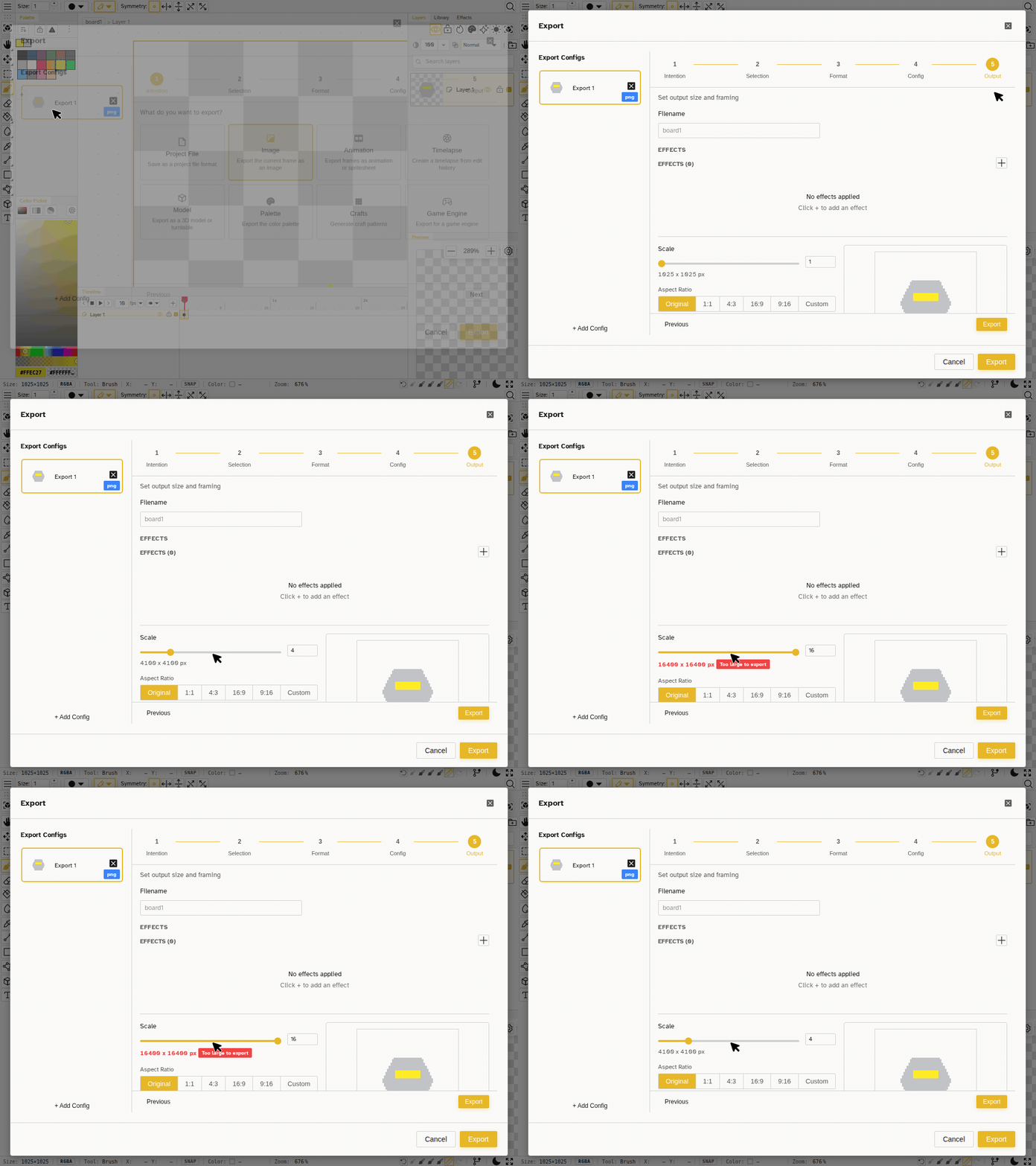
- You can see the size you are exporting. The Output step shows the actual width and height next to the scale slider, so “8x” on a 1024 square board reads as 8192 by 8192 instead of leaving you to do the math. It flags the number when it crosses what can be rendered, and no longer tries to preview an image that is too large to render.
- Scale works on turntable and sprite stack. The slider was live in the interface and ignored by the renderer, so 1x and 8x produced identical files. It now scales the output.
- Controls that did nothing are gone. Aspect ratio, crop, and padding no longer appear on model exports that ignore them, and the scale slider is off
.vox, whose size comes from the board’s geometry. - GIFs stay within what a GIF can hold. Scaling past the size the format can store now clamps instead of writing a file no viewer opens.
- The second GIF export is not blank. Exporting an animation twice in one session gave you a correct file and then one with the background but no art.
Stylus-Only Drawing
A new Draw with finger setting. Turn it off and Novaboard goes stylus-only: the pen draws, and your finger only pans, zooms, swipes between frames, and opens the wheel menu. Palm rejection used to hold only while the pen was actually touching the screen, so between strokes a resting hand still painted. Now it never does. Frame swipes also work anywhere on the canvas in this mode instead of only at the edges, since nothing is competing for the middle.
Smaller Touches
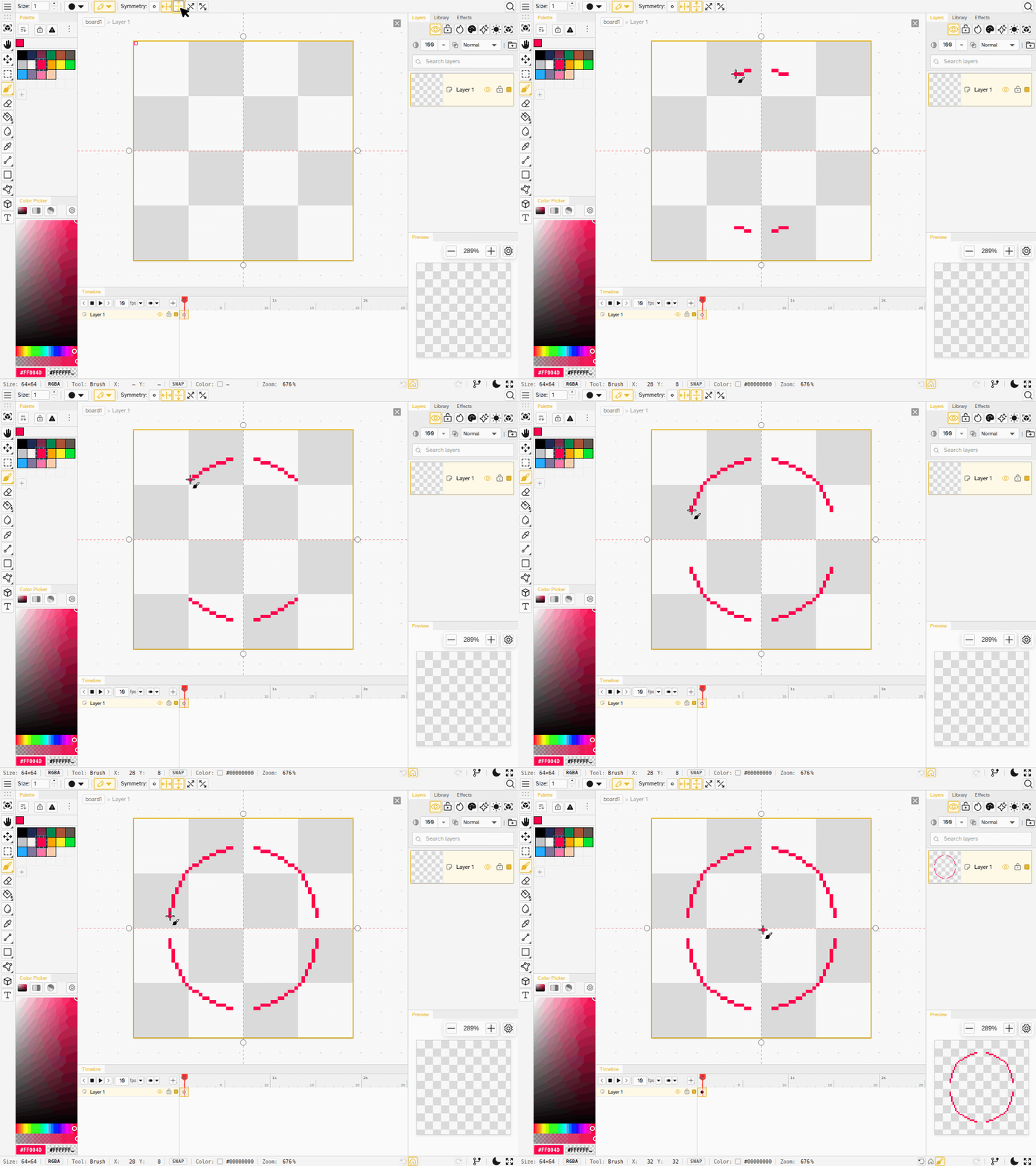
- Symmetry mirrors appear as you draw. With a symmetry axis on, the mirrored half of the stroke only showed up when you let go. It now paints along with the cursor.
- One clipboard. Copying anything inside Novaboard used to block pasting images from outside for the rest of the session. Most recent copy wins.
- The timeline keeps its height. Every hide and show of the timeline panel gave 5% of its height to the canvas and never gave it back.
- Fast cel drags register. Dragging cels quickly enough that the move happened inside a single frame collapsed into a plain click and the cels stayed where they were.
- Delete works on the first frame. Pressing Delete on the first frame cleared its content once, and every press after that was a silent no-op. The first press clears it and the next one removes the frame.
- Reimporting a
.novafile gives you your board back. An exported file reopened as a board with fresh internal ids, which broke the undo history it carried. It now comes back exactly as it left, and importing the same file twice gives you a real duplicate for the second one. - The Move Cel dialog respects locks. It refused locked layers only on the first frame, and moved them anywhere else. It now refuses on every frame, with a message rather than a dialog that just closes.
- The site loads faster. The homepage no longer waits on the editor’s styling to paint, and the hero video’s first frame is fetched with priority.
Bug Fixes
- Active Layer Highlight and onion skin show up. Turning on the highlight dimmed nothing on screen, and onion skin was invisible the same way, on some boards.
- Split Image composites properly. Layer opacity was ignored entirely, and every transparent pixel in an upper layer erased the layers underneath it, so a multi-layer board split down to whichever layer was on top.
- Splitting a moved layer cuts in the right place. If the layer’s content had been moved, every cell came out shifted, the last ones were cut short, and the auto-detect boxes landed in the wrong spots. The preview and the detection also disagreed about where content was.
- Text layers stay where you put them. After transforming a text layer, editing the text again re-rendered it at its old position and snapped it back.
- The board border stays a border. At some zoom levels the focused board’s border broke into a band of checkerboard along the right and bottom edges.
- The checkerboard settings preview matches your board. A layer whose content had been moved previewed at the wrong offset, with the rest cut away.
- No error toasts during fast undo and redo. Holding undo and redo could pop “Something went wrong” for a board that was perfectly fine, and then rebuild it for no reason.
- A failed update tells you. If applying an update did not go through, the prompt now stays up with an error and a working button instead of disappearing.
- Iso volumes preview in the color they commit. On an indexed board the preview could show a color slightly off from the one that landed.