
If 0.20.0 was the biggest release, this is the most careful one. The theme this cycle was trust: making sure that no matter what you do — flip, rotate, resize, undo, branch, save, reopen — every pixel you drew is still exactly where you left it. We rebuilt the machinery under undo and history from the ground up, then spent weeks attacking it with automated adversarial testing that generated thousands of random drawing sessions and checked every one, pixel by pixel, against what should have happened. It found real bugs. We fixed all of them. Alongside that campaign: transforms that never throw pixels away, two new layer effects, and sharper text.
What’s new:
Transforms Never Clip · Undo You Can Trust · New Layer Effects · Sharper Text · Smaller Touches · Bug Fixes
Transforms Never Clip
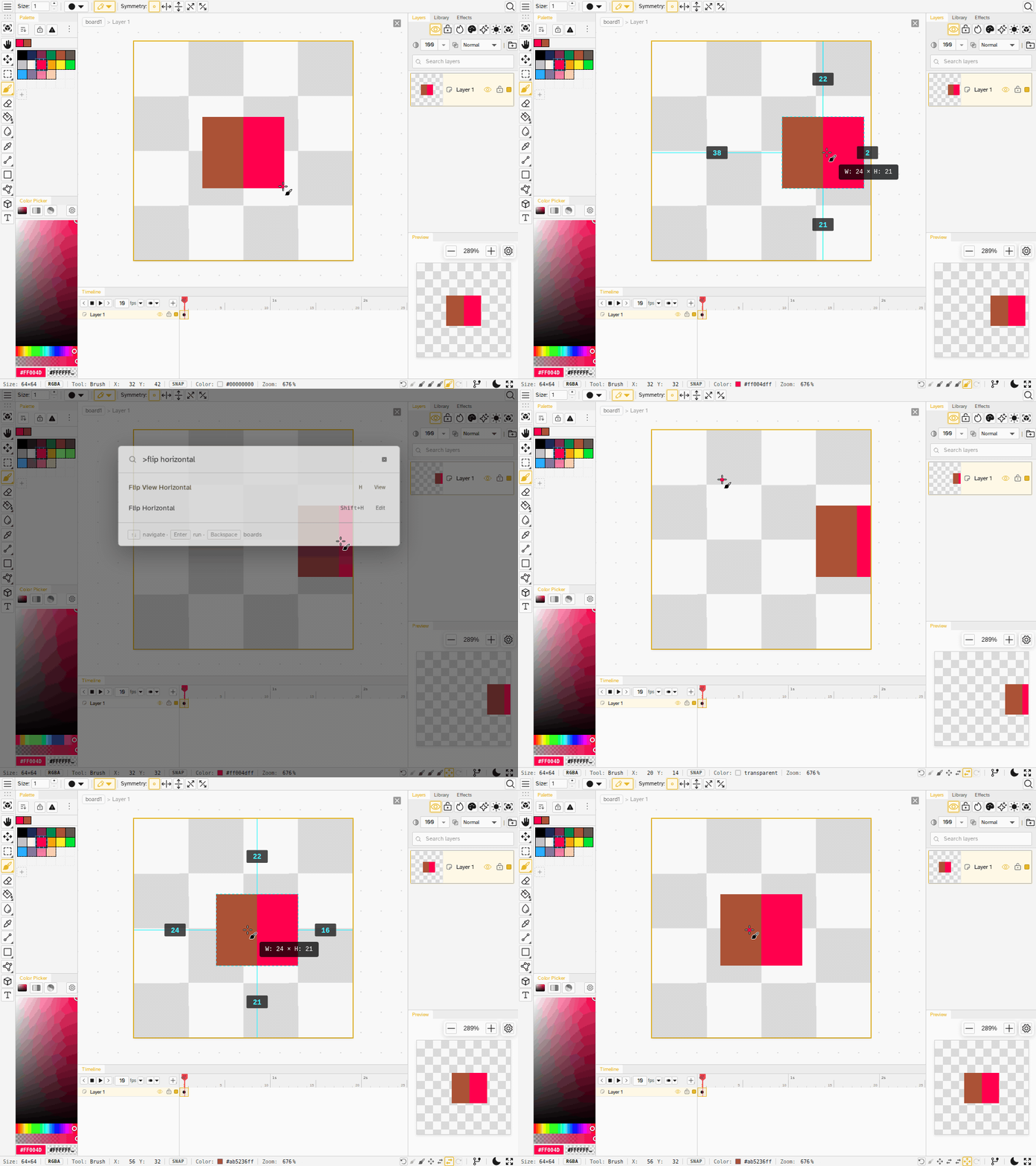
In 0.20.0, cels learned to keep content you moved past the canvas edge. This release finishes the promise: nothing you do to a layer or board throws that content away anymore.
- Flips and rotations keep everything. Flipping or rotating a layer or the whole board used to silently delete whatever sat off-canvas. Now the full content mirrors or turns, so pixels hidden past one edge come around to the other side intact.
- The transform tool preserves too. Moving, scaling, or rotating with the transform tool no longer destroys content an earlier move had pushed off-canvas — even a small unrelated marquee move used to wipe it.
- Canvas Size never cuts. Shrinking the canvas now just hides what falls outside; grow the canvas again and it’s all still there. Only Crop and Image Size actually remove pixels, because that’s what you asked them for.
Undo You Can Trust
Undo, redo, and the board history got the deepest reliability work Novaboard has ever had. The short version: time travel now restores everything, and we can prove it.
- Restoring history restores the whole board. Jumping to an earlier point — from the history dialog, a branch switch, or a long undo run — used to bring back the pixels but quietly keep today’s layer names, opacity, visibility, locks, blend modes, groups, effects, layer order, slices, and frame setup. All of it now reverts to exactly how it was at that moment, including frames you had added, deleted, renamed, or locked since.
- The history dialog does what it says. Clicking an entry now actually takes you there instead of showing a preview that fell out of sync with undo, closing the dialog keeps what you were looking at, and a new Restore button returns you to where you were when you opened it. Clicking through entries as fast as you like is safe too — each click lands cleanly instead of blending two moments together.
- Broken histories repair themselves. A board whose undo history had quietly broken in an earlier version — including one saved into a
.novafile — is now detected and repaired when you open it, instead of failing strangely later. - Undo all the way back means all the way back. Holding undo to the start of history now lands on the truly blank board you began with.
- Your
.novafiles round-trip exactly. Reopened files land on the frame and layer you had active, keep pixels you’d moved past the canvas edge, and undo correctly after import — including redoing work the transform tool had created.
Behind these are dozens of subtler fixes the adversarial campaign surfaced; the worst of them are in the bug fixes below.
New Layer Effects
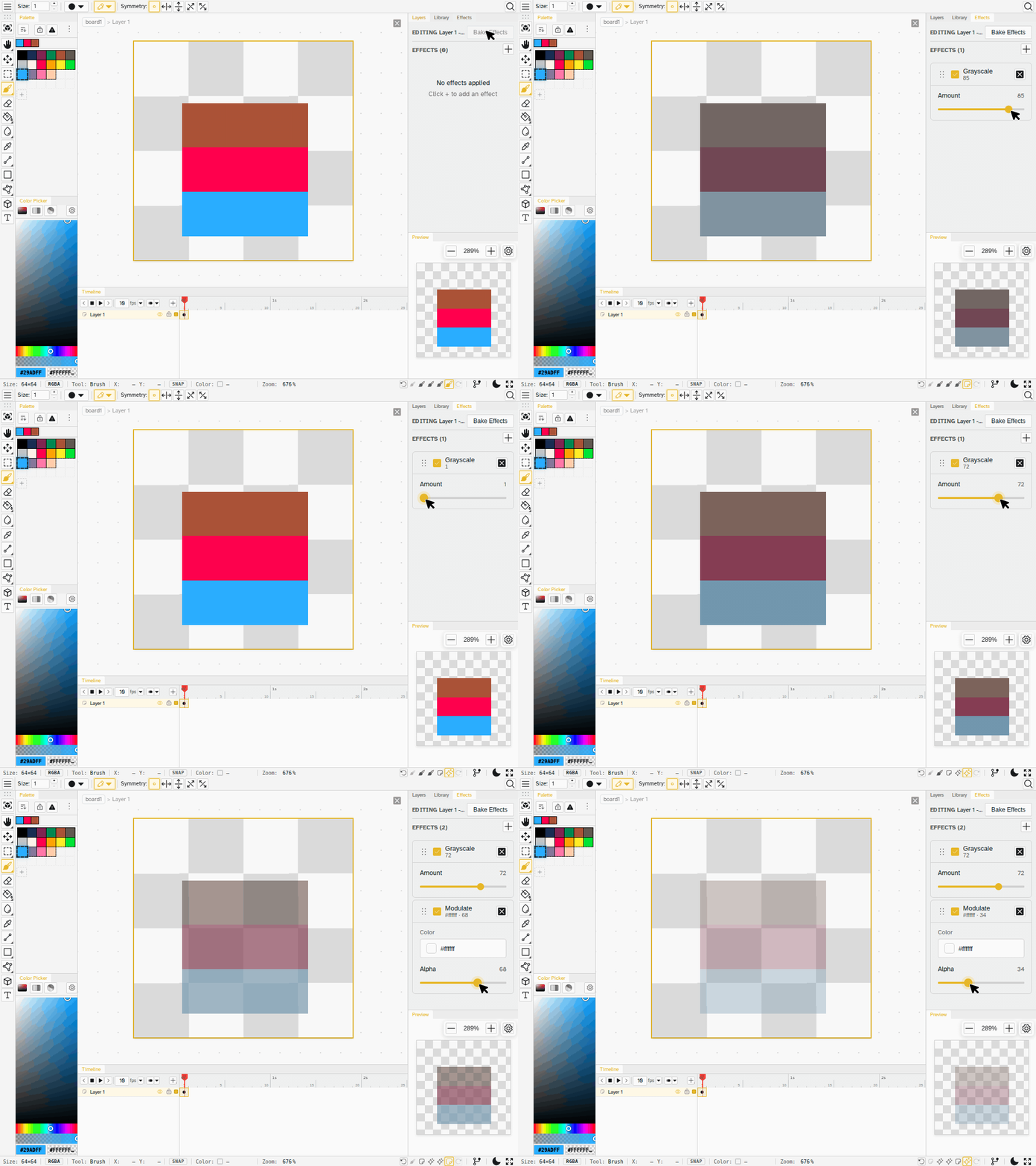
Two new entries in the effects list:
- Grayscale drains the color out of a layer, with an amount slider to blend between full color and none — handy for fading elements back or previewing values.
- Modulate tints a layer the way game engines do: pick a color, and the layer multiplies through it, with an extra alpha fade. If you’re headed for Godot, this is a live preview of its modulate property.
Like every layer effect, both are non-destructive, stack with the others, and can be baked down when you’re done.
Sharper Text
The text tool’s rendering got a precision pass:
- Same result everywhere. Text now rasterizes identically across browsers instead of picking up each one’s smoothing quirks.
- Crisp baselines. Letters snap to the pixel grid at the baseline, so rows of text sit sharp instead of slightly blurred.
- Kerning survives. Letter pairs keep their proper spacing in both smooth and pixel-snap modes, and the same letter always rasterizes the same way.
- Measured means measured. The text box height now matches what actually renders, underlines sit where the font says they should, and emoji no longer break the layout. Bitmap-style fonts render with noticeably smoother edges too.
Smaller Touches
- A better first landing. The homepage got a full redesign, and starting from it now opens the New Board dialog on the Starters tab, so your first moments are picking something fun to make instead of staring at a blank canvas.
- Faster pages. The site and editor load noticeably quicker, and the editor no longer shifts around while it boots.
- More accessible. Screen readers now get proper names for the canvas and controls, light-theme contrast was raised where it fell short, the homepage video has captions, and it respects your reduced-motion setting.
- Center Cel to Canvas. The Reset Cel Position command from 0.20.0 is now Center Cel to Canvas, and it does what the new name says: it centers the cel’s content on the canvas, which always brings every stray pixel back into view.
- Real icons everywhere. Every emoji and text symbol standing in for an icon — the mobile timeline’s trash can, transport controls, gesture hints, checkmarks, arrows — is now a proper icon that matches the set and stays the same size on every platform.
- Translations got a full review. Every language was checked line by line against the English source: stale strings updated, mistranslations fixed, and terminology made consistent within each language.
- Clearer privacy choices. The analytics consent banner is now a plain yes or no, the cookies page shows your current choice with controls to change it, and declining takes effect immediately.
Bug Fixes
The adversarial testing campaign checked thousands of generated drawing sessions pixel-by-pixel and every discrepancy was chased to a real bug. The ones you might have hit:
- Duplicating a layer keeps every pixel. Duplicating could silently drop parts of a layer’s content.
- Moved cels draw completely. Content moved past the top-left canvas edge could go missing from the screen, be destroyed by a color filter, or confuse the gradient, bucket, and shading tools.
- Indexed boards export for real. Exporting an indexed-palette board to Aseprite, ORA, Piskel, or PSD produced blank files; all four now export every pixel.
- Moved content exports in place. Graphics Gale, MagicaVoxel, and timelapse exports could shift moved content back to the corner or fill the background with opaque black.
- Live previews keep up. Blur, jumble, dodge, burn, and the shading tool used to freeze the canvas preview mid-drag and only show the result when you let go; they now paint live under the cursor.
- Baking effects matches the preview. Baking a layer’s effects could produce a visibly different result than the live render for edge-hugging effects like vignette, glow, and shadow — and silently skipped indexed layers. Baked now equals what you saw.
- Edits on held frames land on the right keyframe. Moving a cel or flipping a selection while parked on a held frame edits the keyframe that’s actually showing, undoes correctly, and never spawns a keyframe you didn’t ask for.
- No phantom pixels under the cursor. Closing a menu or dialog with the mouse resting over the canvas could leave a ghost of the brush preview stamped at the wrong spot.
- Merged undo steps keep every stroke. Fast consecutive strokes that merge into one undo entry no longer lose one, and a stroke that changed nothing can no longer wipe pixels when undone.
- Indexed boards stop coming back blank. Undoing a deleted cel or keyframe on an indexed board restored an empty cel, and several operations quietly read blanks instead of your art.
- Transforming cels across frames uses each frame’s own content instead of stamping one frame’s artwork onto all of them.
- The Effects panel follows the timeline. It used to keep showing the previous frame or layer, and edits could land on the wrong keyframe.
- The update prompt shows once. Accepting an update no longer pops the same prompt again after the reload.
- The app heals itself after an update. Loading a stale cached page now recovers automatically instead of showing a blank screen.
- The free web tools are sturdier. The converter and filter pages no longer hang on huge images or get stuck refreshing themselves, and when a file does fail they show what went wrong instead of spinning forever.
- Fewer junk error toasts. Background saving hiccups no longer pop “Something went wrong” for things that already handled themselves.