
Like the last few, this release is mostly polish. The theme this cycle was making Novaboard feel right no matter what you’re drawing on. The editor now reshapes itself for phones, tablets, and desktops, touch got the full menus and gestures it was missing, and keyboard users got customizable multi-stroke shortcuts. It’s another stepping stone toward 1.0 rather than a big new-feature drop, but the app meets you where you are now.
What’s new:
Phone, Tablet & Desktop Layouts · Customizable Shortcuts · Onion Skin Strength · Indexed Export · Desktop · Smaller Touches · Bug Fixes
Phone, Tablet & Desktop Layouts
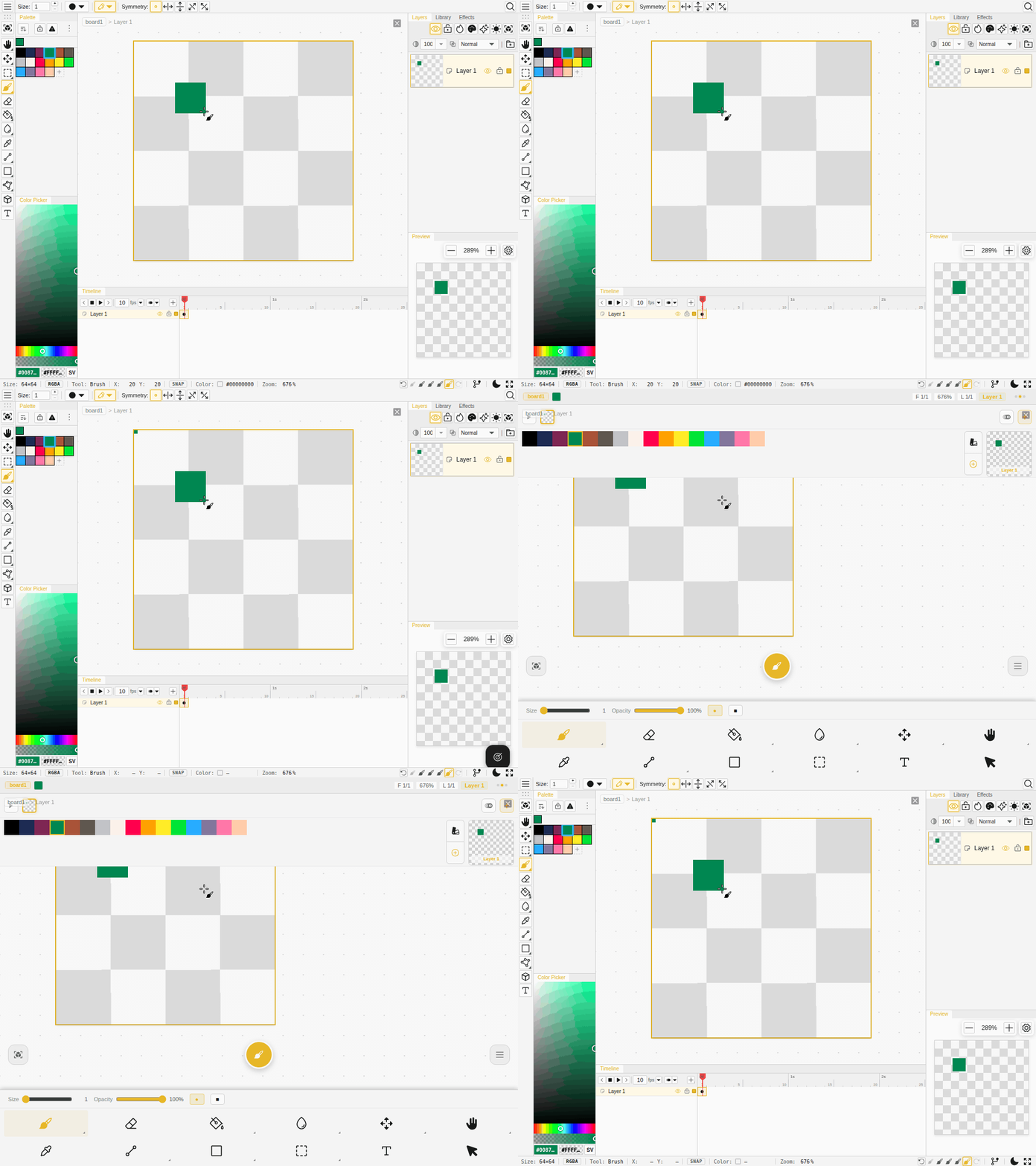
Novaboard now picks a layout that fits the device you’re on, and you can switch it yourself from the new Display menu (Window → Display on desktop and tablet, or the menu sheet on mobile):
- Tablets get their own layout. iPad and other touch tablets keep the full docked workspace instead of falling back to the phone shell, with touch entry points layered on top.
- Full menus on touch. The File, Edit, Image, Select, Layer, View, and Window menus are now all available in the mobile menu sheet, not just on the desktop menu bar.
- Long-press everywhere. Press and hold on the canvas to open the wheel menu, and press and hold any layer, cel, or tab to open its context menu, on both tablet and phone. It’s the same gesture across the whole app now.
- Per-layout workspaces. Saved workspace layouts are remembered separately for each mode, so your desktop arrangement doesn’t get squashed onto a phone.
Customizable Shortcuts
Keyboard shortcuts got more flexible:
- Multi-stroke chords. A shortcut can now be a sequence like Ctrl+K then Ctrl+J. Record one in the keymap editor and a little hint shows the pending chord while you type it. No chords ship on by default, so nothing changes unless you set one up.
- Remappable hold keys. The size-scrub key (D) and the color-mode holds (Alt+H / Alt+S / Alt+L) can now be reassigned like any other shortcut.
Onion Skin Strength
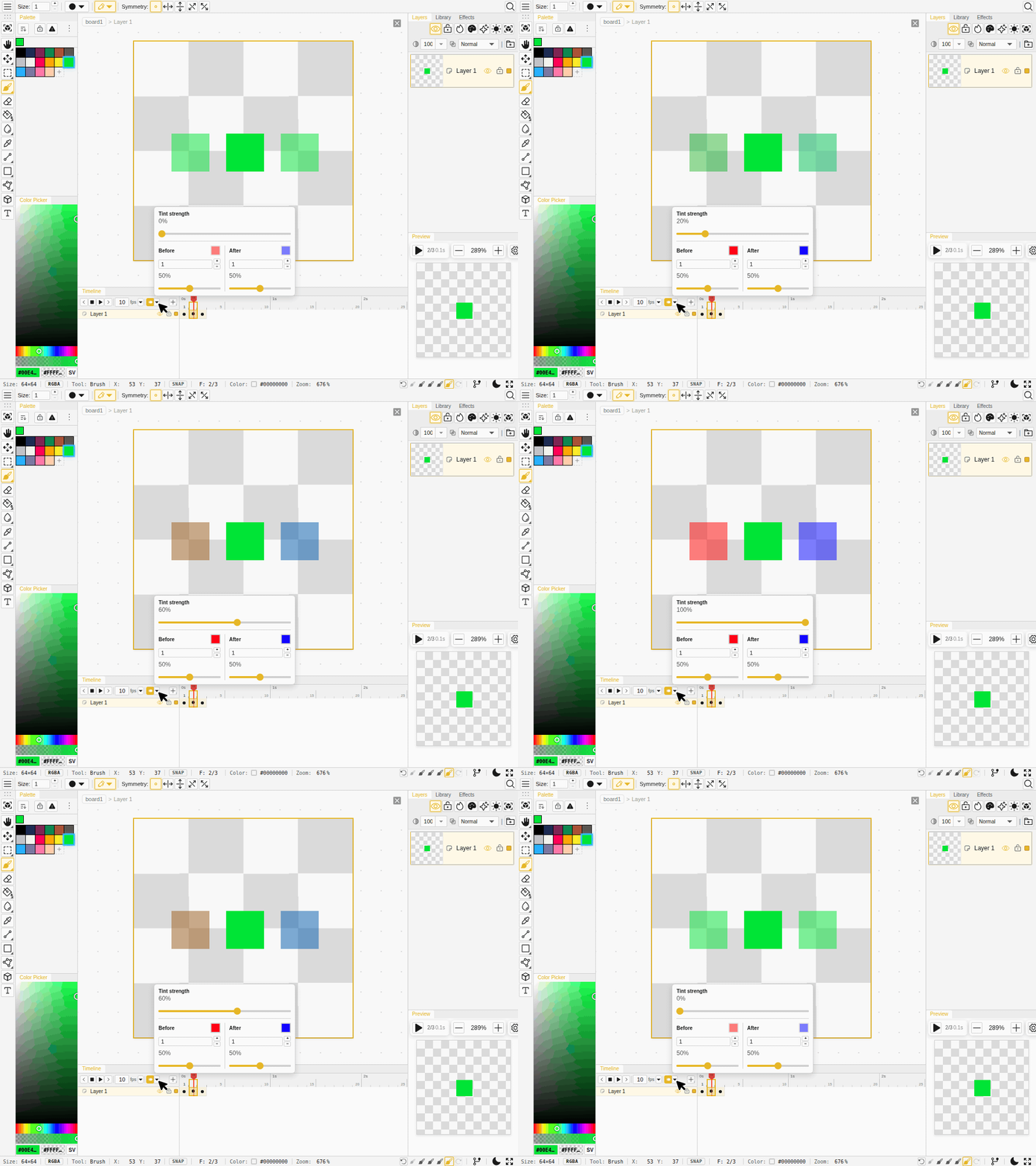
Onion skin used to flat-fill the ghost frames with a solid color, which wiped out all the line art. Now there’s a tint strength slider from 0 to 100% instead of an on/off toggle, and it defaults to 0 so the real colors of your surrounding frames show through. Turn it up when you want flatter silhouettes. The strength control is now on mobile too.
Indexed Export
Boards drawn in indexed-color mode now export true palettized files. PNG and GIF exports write your actual palette straight to disk instead of flattening to full color and re-guessing a palette, so the colors come out exactly as you set them and the files stay small. Indexed .aseprite files now export as real 8-bit indexed images too.
Desktop
- Open Recent. The desktop app’s File menu now has a native Open Recent list, and your boards show up in the operating system’s own recent-files menu.
- Reveal exported files. Clicking the notification after a long export opens the file’s folder.
- Cleaner imports. Importing images and opening
.novafiles now goes through the native file picker, and opened boards remember where they came from so Save writes back to the same place.
Smaller Touches
- Pencil is now “Pixel Pencil”. The tool was renamed to make it clearer, and the redundant pixel-perfect info badge is gone.
- Shape shortcut toggles outline and fill. Pressing the shape tool’s shortcut again when it’s already active flips between outline and filled.
- Align and distribute can be undone. Aligning or distributing a selection is now a proper undo step.
- More translations. Another batch of panels, dialogs, and the error page that were still in English is now translated across all 14 locales.
- The 4096 size limit is enforced everywhere, on every path that sets a canvas size.
Bug Fixes
- Tile mode draws cleanly. Drawing across a tile seam no longer snaps a straight line, tool previews now show on every tile, dragging across tiles follows your cursor continuously, and the tiled board no longer blanks out or misaligns its checker backdrop.
- Shapes are tidier. Rounded-rectangle corners no longer draw stray chord lines, and finished shapes reliably stick instead of vanishing after you commit.
- Repeated flips work. Pressing Shift+H or Shift+V several times in a row now keeps flipping instead of freezing after the first flip.
- Zoom stays under the cursor. Wheel-zoom now anchors to the point under your pointer, and the cursor lines up exactly with the pixels at any fractional zoom.
- Cel inspection is steadier. The cursor tracks correctly while dragging in cel-inspection mode, and a stale brush stamp no longer lingers on the canvas.
- Active-layer highlight behaves. Erase and live previews now show through the highlight, and it repaints when you switch the active layer.
- Tablet fixes. Long-press context menus work on timeline cels and dock tabs, holding to open the wheel menu no longer stamps a stray brush dab, and typing a number with the pen (Scribble) no longer emits garbage values.
- IsoDraw fixes. The context menu stays put over a transformed board, its Apply and Cancel go through the normal commit path, box volumes follow rotation like every other volume, and curved-volume shading scales with size.
- Palette saves are safe. If saving a palette fails, the change rolls back instead of leaving the palette in a broken state.
- Deleting a frame keeps tags intact. Delete-then-undo no longer shifts your animation tag ranges.
- Indexed transparency holds. Filling missing areas and removing a palette entry now respect the board’s transparent color instead of recoloring pixels.
- Menus and sliders. Keyboard navigation opens submenus and no longer leaks Escape or Enter into the dialog behind them, and formatted sliders (brush dynamics, onion opacity, grid opacity, and more) show their labels again.
- Back to the workspace. The X button that returns to the board list no longer gets swallowed while you’re drawing.
- Zen mode on mobile. The four-finger tap now hides the chrome on phones.
- Wheel menu editor lines up. The editor’s slot ring and center button are centered again, and its menus no longer add a stray scrollbar to the dialog.