
Like the last one, this release is mostly polish. The bulk of this cycle went into squaring Novaboard away for a 1.0 release: finishing half-built features, tightening the editor, and paying down accumulated internal debt. v0.16.0 is another stepping stone in that direction rather than a big new-feature drop. (The paid desktop app isn’t out yet, but a lot of the groundwork landed here.)
That said, there’s plenty you can see and touch: the effects library got a lot bigger with a proper menu to browse it, indexed color mode is now a first-class mode instead of a one-way conversion, and the isometric tool was rebuilt.
What’s new:
A Bigger Effects Library · Indexed Color Mode, For Real · Isometric, Rebuilt · Palette Import & Export · Popout Windows · Import as Board · Timeline · Animation Defaults · Text Tool · Smaller Touches · Bug Fixes
A Bigger Effects Library
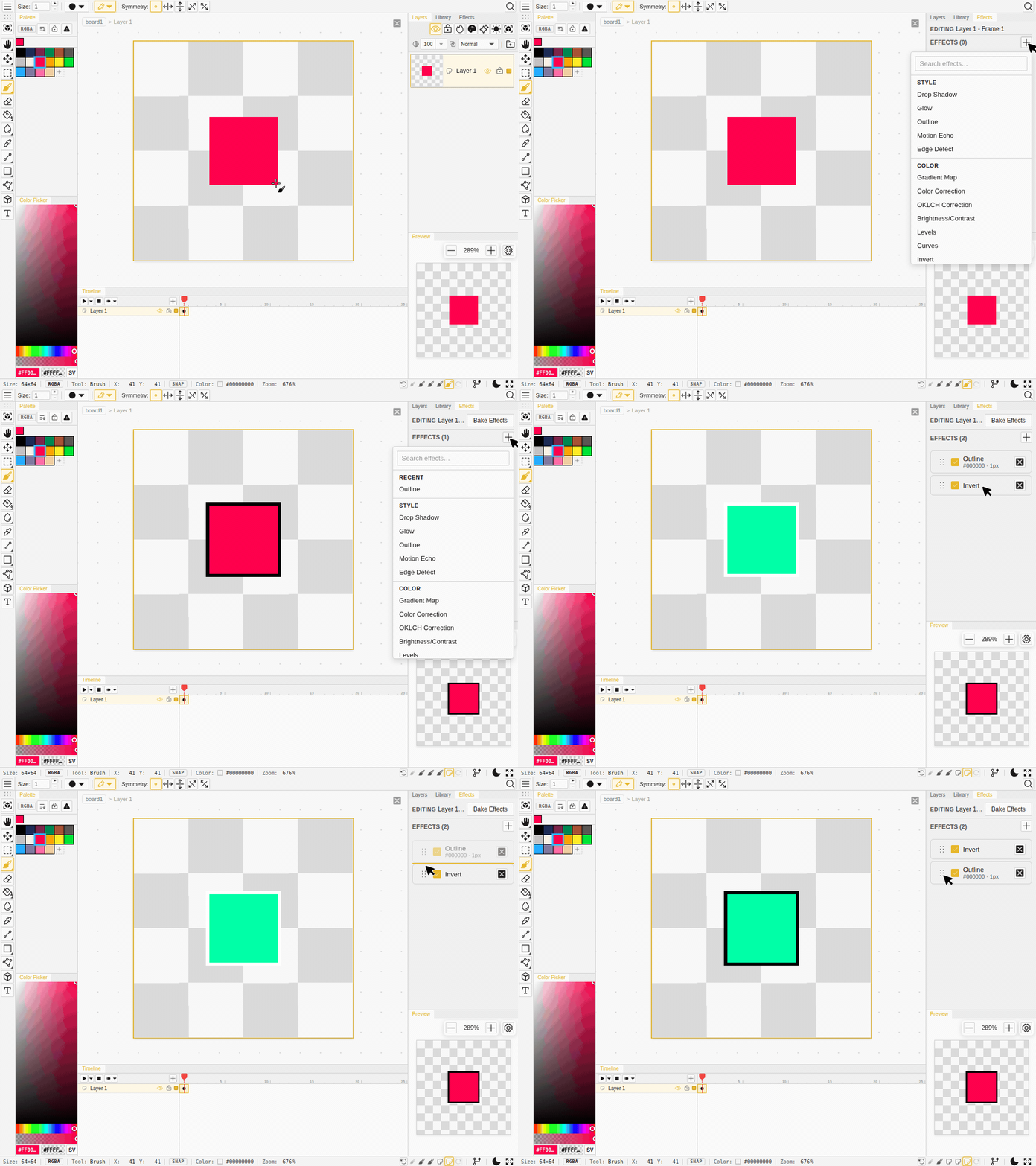
The dockable effects panel arrived last cycle; this cycle it got a lot more to put in it. Nine new layer effects landed:
- Bloom: bright-pass + blur + additive composite for a soft glow on highlights
- Curves: per-channel tone curve
- Dither: ordered Bayer/noise threshold with posterize
- Edge Detect: outline the edges in a layer
- Noise / Grain: add film-style noise
- OKLCH Correction: perceptual lightness/chroma/hue correction
- Palette Swap: remap a layer’s colors through a palette
- Motion Echo: onion-skin-style ghosts of previous frames, each rendered with their own effects
- Pixelate: block-snap to the origin pixel
These are all still under review, so expect some of them to get further polish before the next version.
Browsing them is easier too:
- Categorized, searchable add-effect menu: effects are grouped (style, color, palette, screen, distort, lens), with a search box and full keyboard navigation
- Recents: the effects you’ve used most recently show up at the top of the menu
- Drag-to-reorder stack: grab a card by its handle to change the order effects apply in
- Param summaries on collapsed cards: see an effect’s key values at a glance without expanding it
Indexed Color Mode, For Real
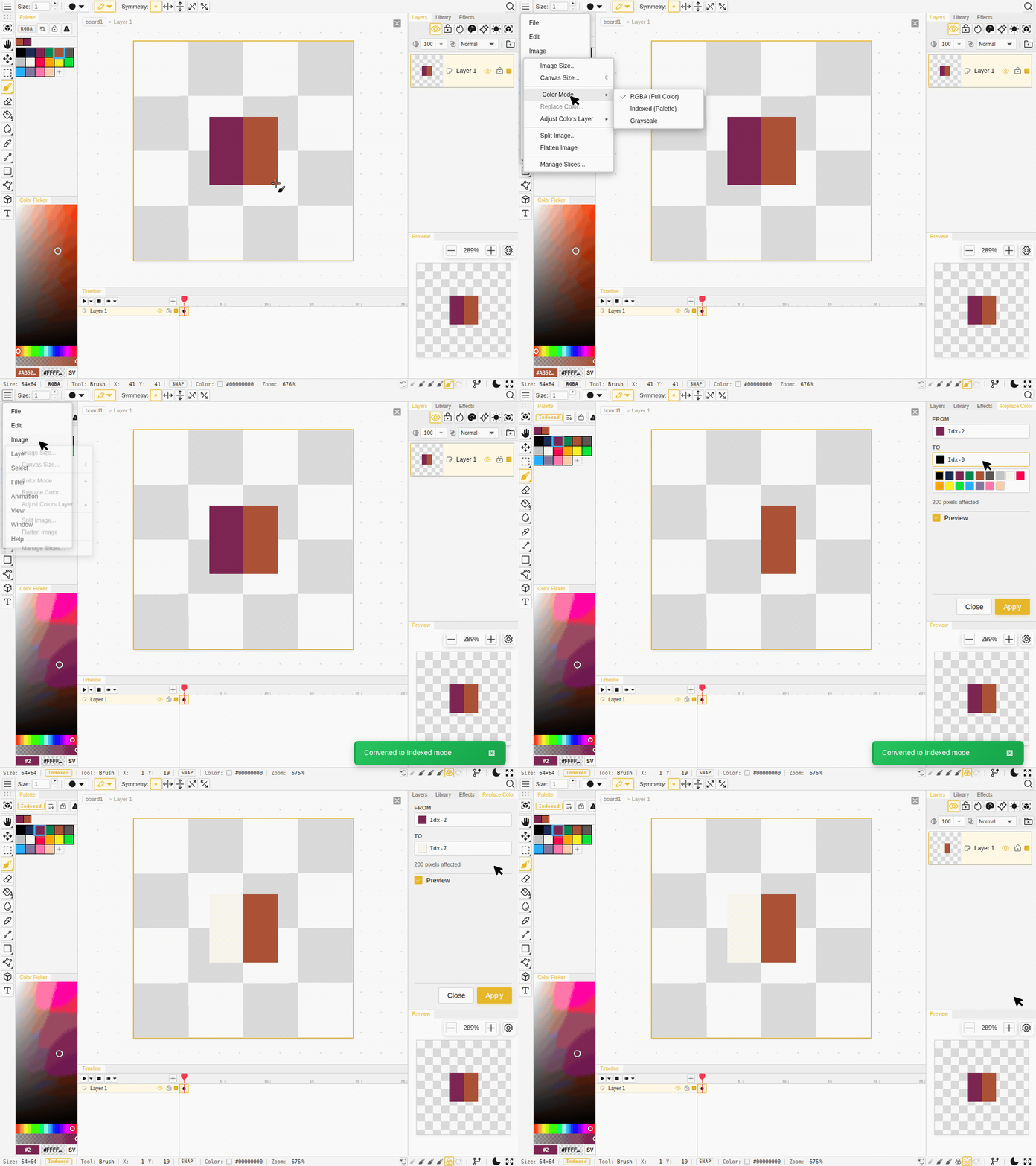
Indexed mode used to be a conversion that baked colors in. Now pixels store palette indices rather than RGBA, and the rest of the editor goes along with that:
- Reorder the palette and the image follows: dragging swatches into a new order rewrites the pixel indices so the picture stays visually identical, all in a single undo step
- Replace Color panel: pick a from-color and a to-color from the palette, see the affected-pixel count live, preview on canvas, and apply as one undoable change
- Palette Swap works end to end: the layer effect remaps through the active palette correctly
Isometric, Rebuilt
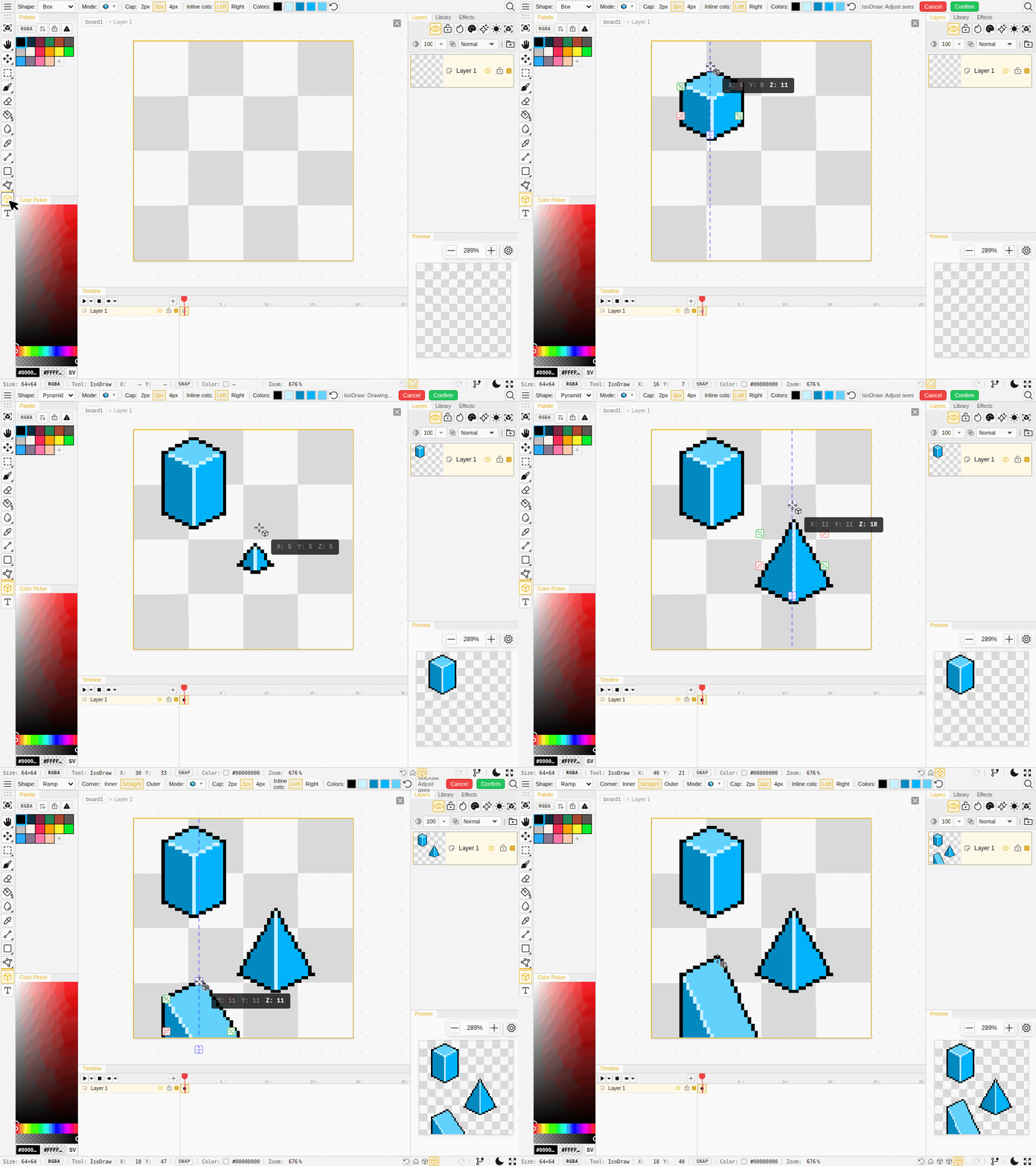
The isometric drawing tool was rebuilt on a new v2 renderer, and the old pipeline is gone:
- New volumes: sphere/ellipsoid, dome, stairs, and corner ramps join the box, pyramid, ramp, prism, cylinder, and cone
- Inner / normal / outer corner toggle for ramps and stairs, so corners join the way you want
- Inscribed-ellipse cylinders and cones: round volumes never bulge past their bounding box
- All six core volumes across 24 orientations, with rotation that follows the shape’s true ground axes
- A long list of geometry repairs: clean line work, no stray islands, no doubled stairs or dangling pixels
The volumes still have rough edges we’re working through, and the full set of per-shape render modes is still being built out; each shape only lists the modes whose renderers are finished. Expect the remaining volumes and modes to firm up over the next few releases.
Palette Import & Export
- More formats: added
.hexand.actimport and export, so palettes move cleanly between Novaboard and other tools - Spec-compliance fixes for GPL, PAL, ACO, and ASE, including GPL CRLF imports and standalone ASE group parsing
Popout Windows
The docking system grew real multi-window support:
- Drag tabs between windows: move a panel tab from the main window into a popout (or back) with a live drop preview
- Drop outside to pop out: release a dragged panel outside the window and it opens in its own floating window at the drop position
- Tab bar as window chrome: popout windows use the tab bar as their header instead of a redundant second bar
- Drop on any zone: floating docks route their drop through the hit-tested zone (sides, Tab to merge, canvas edges) instead of only the viewport edges
- Drag a whole tab group: grab a docked group by its tab-bar background to move it as a unit, with the drag ghost reading
{first} +N tabs
Import as Board
- “Import File as Board” in the board file menu brings a file in as a whole new board; the existing import is now clearly labelled “Import as Layer”
- FORMAT_VERSION validation: opening a
.nova/.novaspacefile checks its format version and warns with a toast if the file was saved by a newer build
Timeline
- Delete Frame: the frame context menu gains a Delete Frame action that respects a multi-frame selection and stays hidden on the last frame
- Header-to-cel range select: clicking a frame header anchors the selection at the top layer, so Shift+clicking a cel selects the range from the header down to it
- Cleaner selection and drag outlines: frame-header and cel selection merge into one continuous outline, and dragging cels or hovering a drop target shows a single outline around the region instead of a dashed box per cel
- Clear keyframe is grouped with Cut keyframe in the cel context menu
Animation Defaults
- Global animation defaults: set a default FPS and onion-skin behavior in preferences, applied to every new board
- Per-section restore-defaults: each preferences section has its own reset, plus a global “Reset everything” if you want to start clean
Text Tool
- Pixel-font bold and italic styles
- Confirm button and a hover preview while placing text
- Anti-aliased size fix and a snap threshold so text lands where you expect
- Font-race-proof commits and a working text-edit undo: editing existing text no longer drops characters or loses history
Smaller Touches
- Per-tool brush size and type memory: each tool remembers the brush you last used with it
- Tool group flyouts open instantly on a single click
- Editable sliders by default: type a value into any slider, not just drag it
- Selection drag inverted: plain drag now moves the selected content, and Ctrl+drag moves just the marquee (the more common action is the default now)
- Ctrl+N creates a new board
- Iso Left / Iso Right transforms are launchable from the command palette
- Mobile gestures: a 4-finger tap toggles zen mode (finger-count taps are now exact, 2 undo, 3 redo, 4+ zen), and a horizontal flick from the left or right screen edge steps through frames
- Ko-fi support button is hidden on the editor route so it stays out of your way while drawing
Bug Fixes
- Cleared layers stay cleared: emptied layer content no longer resurrects from storage on reload, and stale debounced saves can’t bring deleted layers back
- Delete respects your selection: pressing Delete with selected cels or an active canvas selection clears only what’s selected, not the whole layer
- Shortcuts are positional: key matching uses physical key position, fixing conflicts and non-US-layout dispatch; Shift+N no longer creates two layers
- Interactions end cleanly: switching tools, pressing Escape, blurring the window, or changing frames now ends any in-flight drag or stroke
- Tween values are quantized: interpolated scale/rotation/skew snap to two decimals so frames don’t drift
- Toasts render everywhere: the toast container mounts in the root layout, so notifications show on every route
- Rulers create guides on click instead of leaking the pointer through to the board
- Submenus stay anchored to their parent item on scroll and resize
- Tool-group flyout no longer swallows the first canvas interaction after it closes
- Color-mode conversion repaints the canvas immediately
- Effect params edit the right keyframe: tweaking an effect param on a non-keyframe frame now lands on the previous keyframe, like drawing does, instead of creating a stray keyframe
- Zen mode is decoupled from layout presets, so toggling it no longer disturbs your panels
- Handle cursors are correct: rotate/skew/scale handles show the right cursor and lock it while you drag
- Large imports reload intact: multi-tile cels (imports over 256px) were reloading with only their top-left tile; they now restore every tile, and affected boards self-heal on the next load
- Stale chunk reloads: the PWA recovers gracefully when a deploy invalidates a preloaded chunk