
Oh, hey! Hi!
Nice to meet you all, my name is Marcelo and I am here today to talk about Novaboard’s story and a little bit about myself.
I’ve always wanted to work with game development, but for one reason or another I have never fully committed to it. I always thought that game dev was too risky and preferred to work on something more “hireable”, and that is why I became a full-stack web developer, focused on front-end.
How the project started
During this year of 2025, I finally decided that I would give game development a try and some friends and I each decided to make a game in about 2 months. We knew we wouldn’t succeed in developing a full profitable game to publish on Steam yet, so we started making small games to stretch our game development skills.
Our games are being published on itch under a collection. Check them out, comment and rate them! It will help us improve the games.
While working on Quacktory, I noticed that it was not that easy to work on Aseprite assets without having to buy and install it, but I saw no reason why there couldn’t be a web editor that was capable of it.
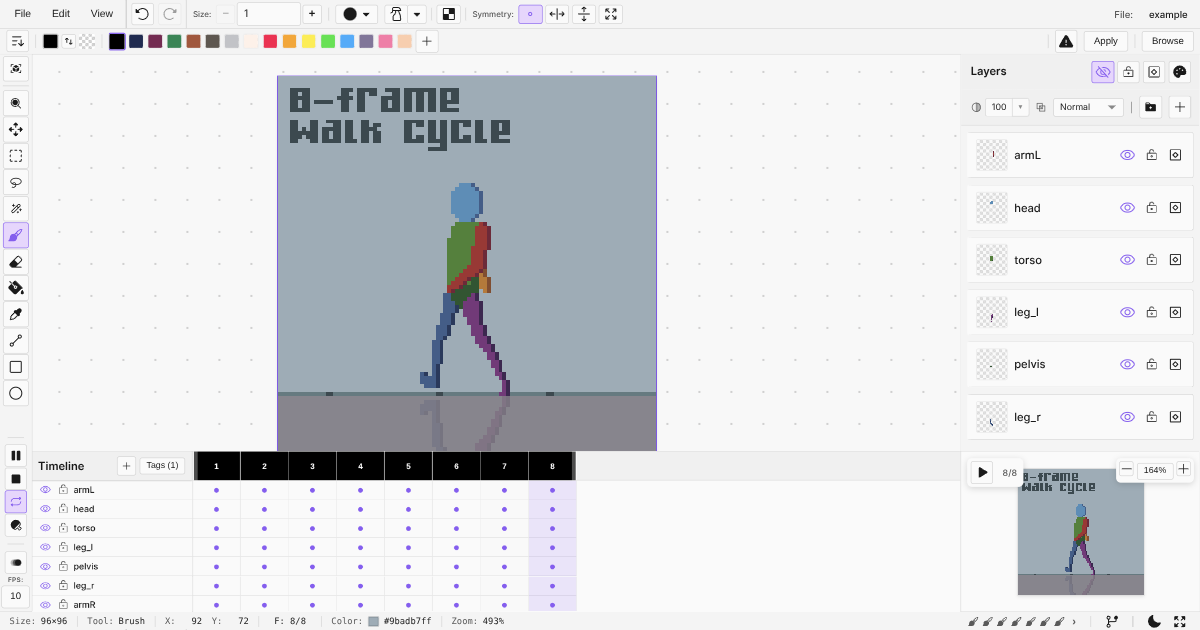
So instead of working on another game, I took my “game development slot” of 2 months to build such a tool (I’m already late by a month on my 2 month project). That is how I’ve started working on Novaboard: a free, browser-based pixel art editor that can open and save Aseprite files.
I built it to solve a need I had while building my hobby indie game project and I believe it will be useful for pixel artists and for other indie game devs too.
What Novaboard can do
- Free and runs directly in your browser - no download or account required
- Opens Aseprite (.ase) and PSD files - edit existing assets without buying software
- Infinite canvas with multiple boards - work on several sprites in one workspace
- Full animation timeline - frames, playback, and live preview for sprite animations
- Visual history with branches - undo/redo with full timeline, never lose a version
- Exports to sprite sheets, GIF, APNG, and timelapse - ready for your game engine or social media
- Auto-saves locally - your work persists even if you close the browser
What’s next
I still have to polish the timeline UX, make the app responsive, improve some export formats, and a few corners here and there, but I plan to invest more of my time on marketing than development; Right now I need more eyes on the app to validate that it is needed / useful, otherwise I will have to focus on something else.
If you find a bug, please report it on the discord server.
Now go ahead and try Novaboard. I’d love to hear what you think!